Temperature monitoring is an essential part of modern embedded systems, whether in home automation, industrial safety, healthcare devices or laboratory equipment. The LM35 sensor is one of the simplest and most accurate temperature sensors widely used with microcontrollers like ATmega16. It provides an analog output voltage directly proportional to temperature in Celsius, which makes it easy to interface with the built-in ADC of ATmega16. By converting this analog voltage into a digital value using the ADC module, we can measure temperature with high accuracy. The measured temperature can be displayed on an LCD, used to trigger alarms, or control fans and heaters. In this tutorial, we will study how the LM35 works, how ATmega16 processes analog signals, and how to write a C program to display the temperature in °C. An animated wiring diagram is also included to help you clearly understand the connection between LM35, ATmega16, and the LCD display.
Understanding LM35 Temperature Sensor
LM35 is a precision integrated-circuit temperature sensor with an analog output. It produces 10 mV per °C rise in temperature. For example, at 25°C it outputs 250 mV, and at 40°C it outputs 400 mV. It does not require calibration and works from 4V to 30V supply. The sensor has three pins: Vcc, Output, and Ground. Since ATmega16 has a 10-bit ADC, it can accurately convert this voltage into a digital value, which can be scaled to temperature.
Pinout of LM35 Sensor
| Pin | Name | Description |
|---|---|---|
| 1 | Vcc | +5V supply |
| 2 | Output | Analog voltage proportional to temperature |
| 3 | GND | Ground |
C Program to Read Temperature from LM35 using ATmega16
The following code reads analog output of LM35 from ADC0 (PA0), converts ADC value into temperature, and displays it on 16×2 LCD.
#include <avr/io.h>
#include <util/delay.h>
#include "lcd.h"

void adc_init() {
    ADMUX = (1 << REFS0);          // AVCC reference, ADC0 channel
    ADCSRA = (1 << ADEN) | (7 << ADPS0);  // Enable ADC, prescaler 128
}

uint16_t adc_read() {
    ADCSRA |= (1 << ADSC);        // Start conversion
    while (ADCSRA & (1 << ADSC));  // Wait for completion
    return ADCW;                   // Return 10-bit result
}

int main(void) {
    lcd_init();
    adc_init();

    char buffer[16];
    uint16_t adc_value;
    float temperature;

    while (1) {
        adc_value = adc_read();

        // Convert ADC value to temperature
        temperature = (adc_value * 4.88) / 10.0;  // 4.88mV step for 5V/1024
        lcd_clear();
        lcd_goto(1, 1);
        lcd_print("Temp: ");
        dtostrf(temperature, 4, 1, buffer);
        lcd_print(buffer);
        lcd_print(" C");

        _delay_ms(500);
    }
}
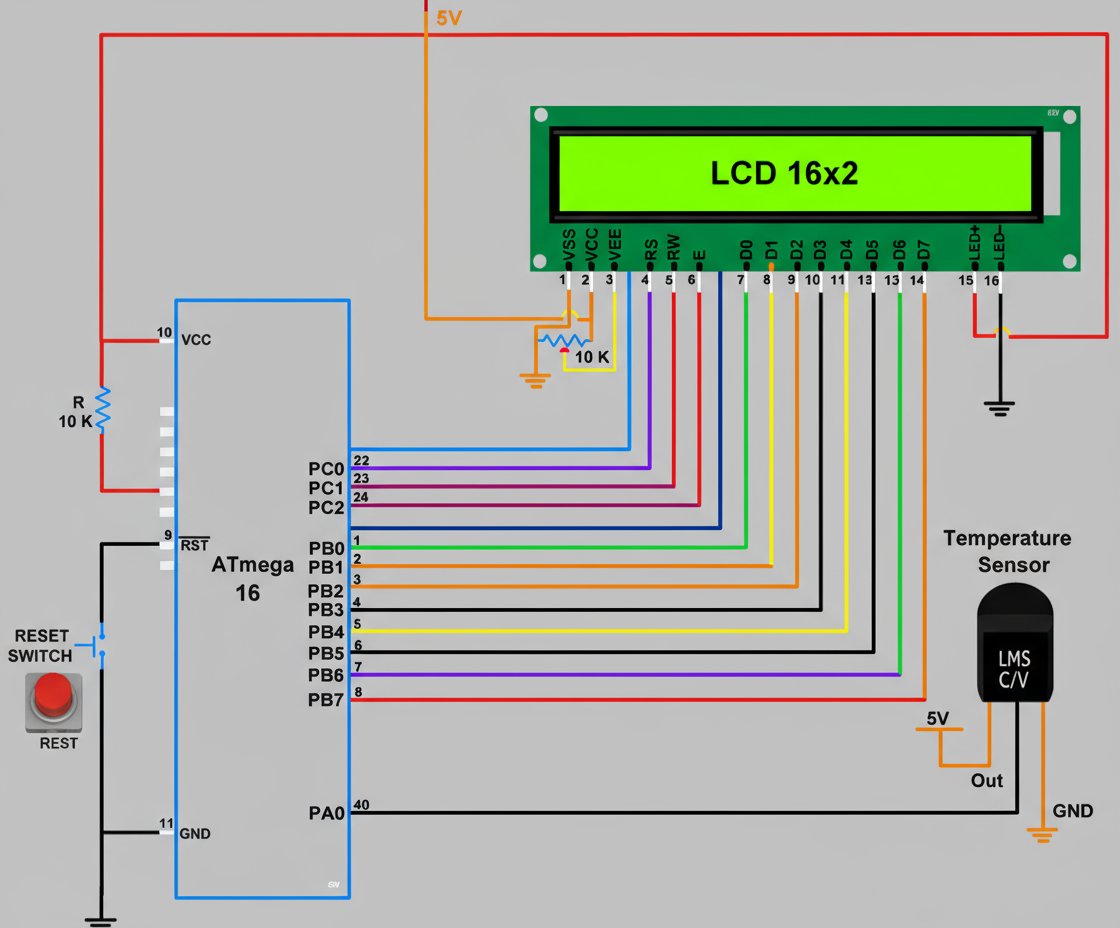
Animated Diagram — LM35 with ATmega16 and LCD
The following animated circuit diagram shows LM35 connected to ADC0 (PA0) of ATmega16 and the LCD displaying the temperature reading. The voltage output from LM35 increases with temperature, and the ADC converts it into a digital value.
How the Code Works
The ADC of ATmega16 converts the analog voltage from LM35 into a 10-bit digital number. Since LM35 gives 10 mV per °C, multiplying ADC output with 4.88 (step size) and dividing by 10 converts it into temperature in °C. The temperature is then displayed on the LCD in real time.
Applications
- Room temperature monitoring system
- Industrial temperature control
- Medical incubators and safety systems
- IoT-based environmental monitoring
Conclusion
LM35 is an extremely simple and accurate sensor for temperature measurement. When combined with ATmega16 and its ADC, we can build reliable temperature monitoring systems. The concept can be further extended to fan control, data logging, alarms, and IoT-based smart automation projects.
Comments
Post a Comment
Subscribe to Post Comments [Atom]