Easy Electronics Tutorials

posted by Hamid Sayyed • November 16, 2025 0 Comments

Welcome to Easy Electronics Tutorials

This website is created to help students learn electronics in a simple and easy way. Below is the list of our main courses. More courses will be added soon.

Sr. No. Course Title Course Code
1 Embedded System with AVR Microcontroller — S.Y.B.Sc. (Computer Science) Sem-III CS-241-MN
2 Coming Soon
3 Coming Soon
4 Coming Soon
5 Coming Soon

CS-241-MN: Embedded System with AVR Microcontroller-S.Y.B.Sc. (Computer Science) Sem-III

posted by Hamid Sayyed • November 15, 2025 0 Comments

This course helps students clearly understand the basics of embedded systems and the role of microcontrollers in real applications. It introduces the AVR family, its architecture, memory organisation, internal registers, and the essential development tools used in industry. Students also learn to write efficient C programs for AVR microcontrollers and use important on-chip peripherals like timers, counters, ADC, serial communication, SPI, and I2C. Along with theory, the course focuses on practical interfacing of LCDs, sensors, motors, relays, and DAC/ADC modules so that learners can design and test complete embedded projects. After completing the course, students will be able to explain embedded concepts, compare microcontrollers and microprocessors, understand AVR architecture, write working C programs, interface external hardware, and finally design small embedded applications that integrate multiple peripherals smoothly.

Post No.Post Title
1.1Embedded Systems: Introduction, Characteristics, Elements and Applications
1.2Embedded Systems Design Metrics
1.3Software Development Tools
1.4Microcontroller & Architectures
1.5Harvard and Von Neumann Architecture
1.6RISC vs CISC Architecture
1.7Concept of Pipelining
1.8Criteria for Choosing a Microcontroller
1.9Difference Between Microcontroller and Microprocessor
Chapter-2: Fundamentals of AVR & Its Programming in C
Post No.Post Title
2.1AVR Microcontroller Overview and Introduction
2.2AVR Family Classification
2.3AVR ATmega16 Architecture
2.4AVR Memory Map and CPU Registers
2.5AVR ALU, I/O Ports, and Programming Tips
2.6Peripherals in AVR Microcontrollers
2.7Programming of AVR in C: Basic Structure
2.8Programming of AVR in C: Data Types
2.9Programming of AVR in C: Operators
2.10Programming of AVR in C: Library Files
2.11Programming of AVR in C: Delay Functions
2.12Simple C Programs: Data Transfer Operation
2.13Simple C Programs: Arithmetic Operation in AVR
2.14Simple C Programs: Decision Making & Code Conversion
Chapter-3: AVR Peripherals Programming in C
Post No.Post Title
3.1AVR Timer Programming: Introduction
3.2Difference Between Timer & Counter Operation
3.4Basic SFR Registers – Timer 0, 1 & 2
3.5Delay Generation Using Timer Registers
3.6Counter Programming
3.7Basics of Serial Communication
3.8Serial vs Parallel, Simplex vs Duplex, Async & Sync
3.9USART Operation and SFR Used
3.10C Programs for UART TX/RX
3.11I2C: Bus Signals, Master-Slave, Addressing
3.12SPI: Introduction and Signalling
3.13C Program for SPI & I2C Communication
3.14On-Chip ADC – Features, Operation, C Programs
Chapter-4: Real World Interfacing with AVR & Case Studies
Post No.Post Title
4.1LED Interfacing with AVR
4.2Push Button Interfacing
4.3Buzzer Interfacing
4.4Seven Segment Display Interfacing
4.5Thumbwheel Switch Interfacing
4.6DC Motor Interfacing
4.7Stepper Motor Interfacing
4.8Relay Interfacing
4.916×2 LCD Interfacing
4.10DAC Interfacing (Waveform Generation)
4.11Traffic Light Controller
4.12Event Counter Using Opto-Interrupter
4.13RTC Interfacing — DS1307 & ATmega16
4.14Temperature Sensor LM35 Interfacing
4.15Smartphone Controlled Devices — HC-05
Note: This consolidated index groups posts exactly as you listed. If you want the table rows to link directly to the live Blogger post URLs, provide the post URLs or allow me to generate slug-friendly URLs and I will add them. I can also generate a printable syllabus PDF or an archive page with thumbnails and quick excerpt previews for each post.

4.15) Smart phone controlled devices using Bluetooth module HC05.

posted by Hamid Sayyed • November 15, 2025 0 Comments

Wireless control of devices using a smartphone and a Bluetooth module is an excellent first wireless project for beginners. Using the HC-05 Bluetooth module together with an ATmega16 microcontroller you can control lights, motors, relays and other loads without any wiring between the user and the appliance. The mobile phone runs a simple terminal or controller app and sends small command bytes such as '1' or '0' which the HC-05 forwards to ATmega16 over UART. ATmega16 reads the incoming bytes, decodes the commands in software and toggles output pins to operate a relay or LED driver. This method requires basic UART setup on ATmega16, safe voltage-level handling between 5V MCU and 3.3V module RX pin, and a simple command protocol for reliable control. The project is low-cost, reliable within Bluetooth range, and useful for home automation demos, lab assignments, and quick prototypes. In this article we will cover HC-05 features and pins, wiring best-practice, voltage level advice, full C source code (escaped for Blogger), smartphone setup, troubleshooting and an animated diagram to visualise data flow. Follow the steps carefully and test first with an LED or small relay module before connecting high-power appliances.

Overview of HC-05 and ATmega16

HC-05 is a Bluetooth-to-UART module commonly used in hobby and educational projects. It supports Bluetooth v2.0 + EDR, is easy to pair with Android phones, and can be configured with AT commands. The module’s TX pin transmits data to the microcontroller RX pin; its RX pin receives data from the MCU TX pin. ATmega16 provides a USART (serial port) that is perfect for communicating at standard baud rates such as 9600 bps. Typical workflow: phone → HC-05 → ATmega16 (UART) → driver (relay/LED/motor).

HC-05 Pin Summary

PinFunction
VCC5V supply (module typically has regulator; check board)
GNDGround
TXDTransmit (Bluetooth → MCU RX)
RXDReceive (MCU TX → Bluetooth) — 3.3V tolerant
STATEConnection status output (optional)
EN / KEYEnter AT mode when pulled high (optional)
Safety tip: HC-05 RX expects 3.3V logic. When connecting MCU TX (5V) to HC-05 RX, always use a simple voltage divider or level shifter to avoid damage. HC-05 TX is usually 3.3V and is safe for MCU RX.

Hardware Connections (recommended)

Connect HC-05 TXD → ATmega16 RXD (PD0). Connect HC-05 RXD ← ATmega16 TXD (PD1) via a voltage divider (e.g., 1.8k & 3.3k). Power HC-05 with 5V (check your breakout board) and common ground with microcontroller. Connect the device driver (relay module or transistor + diode) to a port pin (for example PB0). Use a separate 5V supply for motors or inductive loads and optoisolate or use proper relays and flyback diodes.

Command Protocol and Mobile App

Keep commands tiny and simple — a single ASCII byte is enough. For example: '1' = turn ON, '0' = turn OFF, '2' = toggle, 'S' = status request. On the phone, use any Bluetooth terminal app or a custom app made with MIT App Inventor. Pair with HC-05 (default pin usually 1234 or 0000). After connecting, send characters and the device will respond. If you need feedback, implement simple ACK replies from MCU.

Full C Code (ATmega16) — HTML-escaped for Blogger

This code example configures the USART, reads incoming bytes, processes multiple commands, and drives two outputs (PB0, PB1). It includes a simple acknowledge reply and a basic debounce for safety.

/* ATmega16 — Bluetooth HC-05 control (example)
   - HC-05 TX -> PD0 (RXD)
   - HC-05 RX <- PD1 (TXD) via voltage divider
   - Output devices -> PB0 (Device1), PB1 (Device2)
   - F_CPU assumed (adjust UBRR for your clock)
*/

#include <avr/io.h>
#include <util/delay.h>
#include <avr/interrupt.h>

#define F_CPU 8000000UL

void uart_init(unsigned int ubrr) {
    UBRRH = (unsigned char)(ubrr >> 8);
    UBRRL = (unsigned char)ubrr;
    UCSRB = (1<<RXEN) | (1<<TXEN);   // Enable RX and TX
    UCSRC = (1<<URSEL) | (1<<UCSZ1) | (1<<UCSZ0); // 8-bit data
}

unsigned char uart_receive(void) {
    while (!(UCSRA & (1<<RXC)));    // Wait for data
    return UDR;
}

void uart_transmit(unsigned char data) {
    while (!(UCSRA & (1<<UDRE)));
    UDR = data;
}

int main(void) {
    unsigned int ubrr_value = 51; // 9600 @ 8MHz
    unsigned char cmd;

    // Configure outputs
    DDRB |= (1<<PB0) | (1<<PB1); // PB0, PB1 as output
    PORTB &= ~((1<<PB0) | (1<<PB1))); // Start OFF

    uart_init(ubrr_value);

    while (1) {
        cmd = uart_receive();

        // Simple command set
        if (cmd == '1') {
            PORTB |= (1<<PB0); // Device1 ON
            uart_transmit('A');    // ACK
        }
        else if (cmd == '0') {
            PORTB &= ~(1<<PB0);// Device1 OFF
            uart_transmit('A');
        }
        else if (cmd == '2') {
            PORTB |= (1<<PB1); // Device2 ON
            uart_transmit('B');
        }
        else if (cmd == '3') {
            PORTB &= ~(1<<PB1);// Device2 OFF
            uart_transmit('B');
        }
        else if (cmd == 'S') {    // Status request
            unsigned char status = (PINB & 0x03); // PB0..PB1
            uart_transmit(status + '0'); // send '0'..'3'
        }
        // small debounce / safety
        _delay_ms(50);
    }
}
  

Animated Diagram (data flow)

The diagram below visually shows the smartphone sending a command to HC-05, HC-05 forwarding that to ATmega16 over UART, and ATmega16 switching outputs. The animation also shows small moving dots to indicate serial data flow.

Troubleshooting & Tips

  • If HC-05 does not pair, reset module and try default PIN 1234 or 0000.
  • Use a level-shifter or a simple resistor divider on MCU→HC-05 RX to avoid 5V damage.
  • Test first with an LED before connecting real loads; use relay modules with opto-isolation where possible.
  • Use hardware flow control only if needed; most simple projects work fine at 9600 baud.
  • Keep grounds common and use decoupling capacitors near power pins.

Applications

  • Home lighting and appliance control
  • Remote robot control
  • Smart garden watering systems
  • Wireless test benches and lab automation

Conclusion

Wireless control with HC-05 and ATmega16 is a low-cost, easy-to-learn method to add remote control to your projects. Use simple one-byte commands for reliability, add acknowledgements for two-way safety, and always protect hardware lines with proper drivers and level shifting. Start with an LED or relay module, and expand to multi-device systems or a custom mobile app once the basic flow is stable.

4.14) Interfacing of Temperature Sensor LM35 With Atmega16

posted by Hamid Sayyed • November 15, 2025 0 Comments

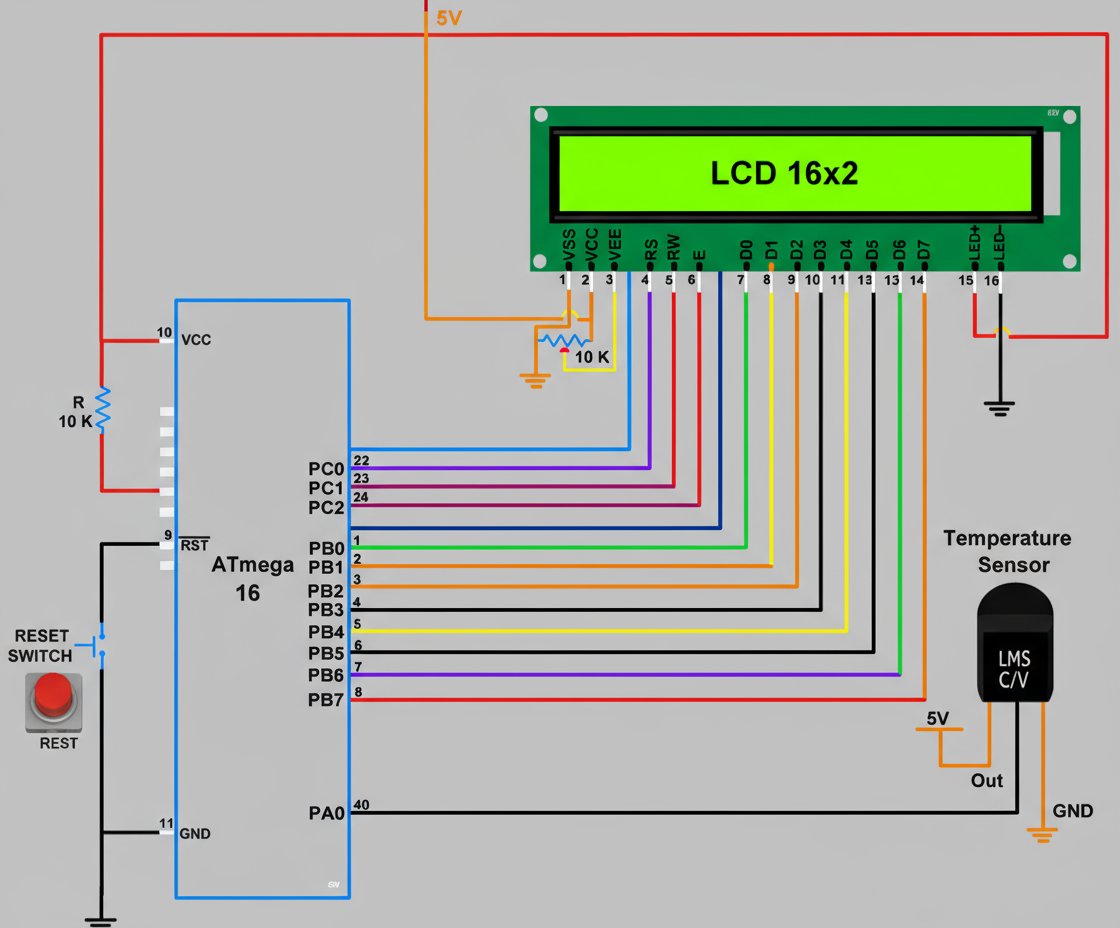
Temperature monitoring is an essential part of modern embedded systems, whether in home automation, industrial safety, healthcare devices or laboratory equipment. The LM35 sensor is one of the simplest and most accurate temperature sensors widely used with microcontrollers like ATmega16. It provides an analog output voltage directly proportional to temperature in Celsius, which makes it easy to interface with the built-in ADC of ATmega16. By converting this analog voltage into a digital value using the ADC module, we can measure temperature with high accuracy. The measured temperature can be displayed on an LCD, used to trigger alarms, or control fans and heaters. In this tutorial, we will study how the LM35 works, how ATmega16 processes analog signals, and how to write a C program to display the temperature in °C. An animated wiring diagram is also included to help you clearly understand the connection between LM35, ATmega16, and the LCD display.

Understanding LM35 Temperature Sensor

LM35 is a precision integrated-circuit temperature sensor with an analog output. It produces 10 mV per °C rise in temperature. For example, at 25°C it outputs 250 mV, and at 40°C it outputs 400 mV. It does not require calibration and works from 4V to 30V supply. The sensor has three pins: Vcc, Output, and Ground. Since ATmega16 has a 10-bit ADC, it can accurately convert this voltage into a digital value, which can be scaled to temperature.

Pinout of LM35 Sensor

PinNameDescription
1Vcc+5V supply
2OutputAnalog voltage proportional to temperature
3GNDGround
Important: LM35 must be connected to an ADC-enabled pin of ATmega16 (such as PA0). Use AVCC and AREF properly for stable ADC performance.

C Program to Read Temperature from LM35 using ATmega16

The following code reads analog output of LM35 from ADC0 (PA0), converts ADC value into temperature, and displays it on 16×2 LCD.

#include <avr/io.h>
#include <util/delay.h>
#include "lcd.h"

void adc_init() {
    ADMUX = (1 << REFS0);          // AVCC reference, ADC0 channel
    ADCSRA = (1 << ADEN) | (7 << ADPS0);  // Enable ADC, prescaler 128
}

uint16_t adc_read() {
    ADCSRA |= (1 << ADSC);        // Start conversion
    while (ADCSRA & (1 << ADSC));  // Wait for completion
    return ADCW;                   // Return 10-bit result
}

int main(void) {
    lcd_init();
    adc_init();

    char buffer[16];
    uint16_t adc_value;
    float temperature;

    while (1) {
        adc_value = adc_read();

        // Convert ADC value to temperature
        temperature = (adc_value * 4.88) / 10.0;  // 4.88mV step for 5V/1024
        lcd_clear();
        lcd_goto(1, 1);
        lcd_print("Temp: ");
        dtostrf(temperature, 4, 1, buffer);
        lcd_print(buffer);
        lcd_print(" C");

        _delay_ms(500);
    }
}
  
LM35 Interfacing

Animated Diagram — LM35 with ATmega16 and LCD

The following animated circuit diagram shows LM35 connected to ADC0 (PA0) of ATmega16 and the LCD displaying the temperature reading. The voltage output from LM35 increases with temperature, and the ADC converts it into a digital value.

How the Code Works

The ADC of ATmega16 converts the analog voltage from LM35 into a 10-bit digital number. Since LM35 gives 10 mV per °C, multiplying ADC output with 4.88 (step size) and dividing by 10 converts it into temperature in °C. The temperature is then displayed on the LCD in real time.

Applications

  • Room temperature monitoring system
  • Industrial temperature control
  • Medical incubators and safety systems
  • IoT-based environmental monitoring

Conclusion

LM35 is an extremely simple and accurate sensor for temperature measurement. When combined with ATmega16 and its ADC, we can build reliable temperature monitoring systems. The concept can be further extended to fan control, data logging, alarms, and IoT-based smart automation projects.

4.13) Case Study: RTC Interfacing DS1307 and ATmega16

posted by Hamid Sayyed • November 15, 2025 0 Comments

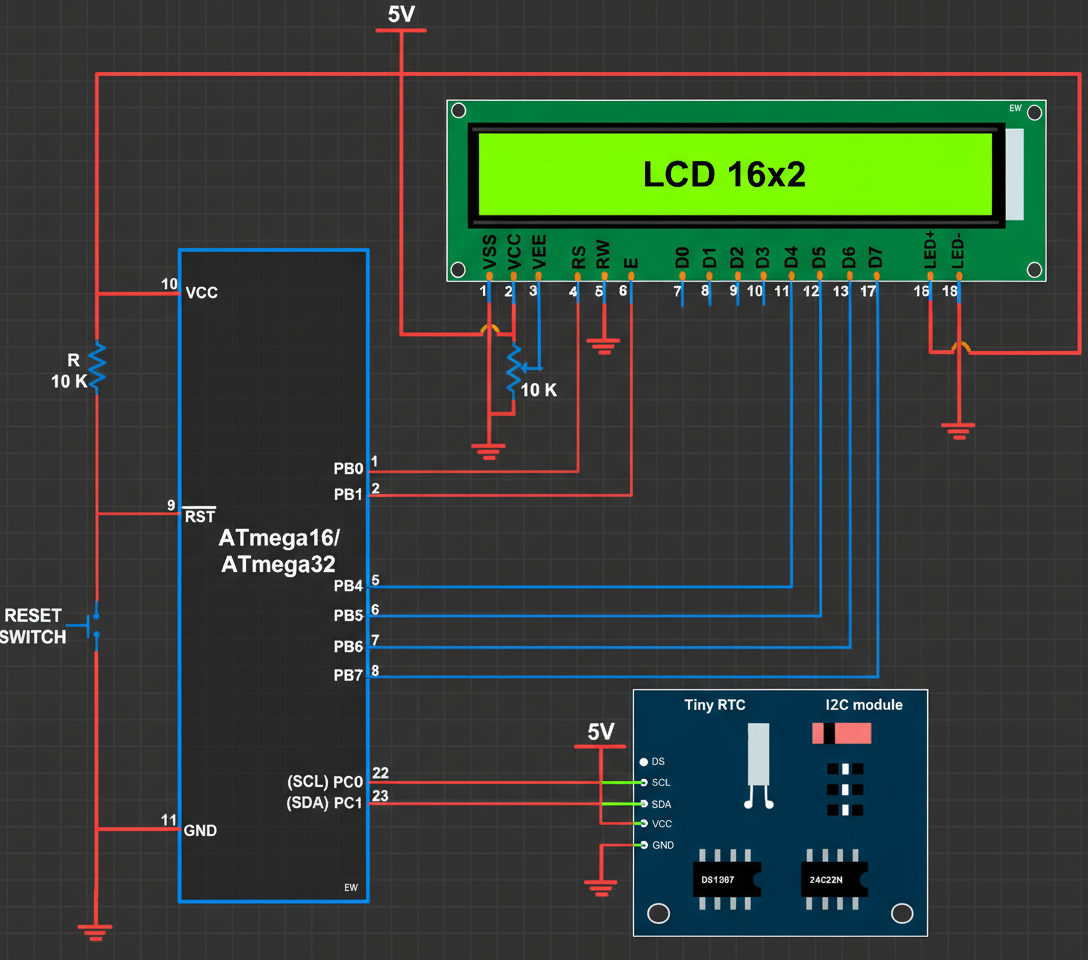
Real time clocks are extremely important when designing embedded systems where accurate timekeeping is needed for daily operations, data logging, metering applications, automation systems, security devices, clocks and alarms. A microcontroller like ATmega16 does not have a dedicated real time clock built inside, so an external RTC chip such as the DS1307 is used. The DS1307 works on the I2C communication protocol and keeps track of seconds, minutes, hours, date, month, year and day of the week, even when the main power is removed because it uses a backup battery. When interfaced with an LCD display, it becomes a complete digital clock system that shows live time continuously. In this blog we will understand how the DS1307 works, learn its pin details, understand the I2C communication between DS1307 and ATmega16, write the C program to read time, and finally display the running time on a 16x2 LCD. The complete explanation is written in simple language with clear diagrams so a beginner can easily understand the overall working.

Introduction to DS1307 RTC

The DS1307 is a low-power, full binary-coded decimal real-time clock that provides details of time and calendar. It uses an external 32.768 kHz crystal oscillator to maintain timing accuracy. It operates on the I2C bus, which means only two wires (SCL and SDA) are required for communication with the microcontroller. A backup battery of 3V (like CR2032) ensures that clock timing continues even if the main supply is removed. The DS1307 contains internal registers for seconds, minutes, hours, day, date, month and year and each register stores data in BCD format.

Pin Description of DS1307 RTC

Pin No. Name Description
1 X1 Crystal oscillator input for 32.768 kHz crystal
2 X2 Crystal oscillator output
3 VBAT Backup battery input (3V lithium cell)
4 GND Ground
5 SDA I2C data line for read/write data
6 SCL I2C clock line
7 SQW/OUT Square wave output (1 Hz, 4 kHz, 8 kHz, 32 kHz)
8 VCC Main 5V power supply

Working Principle of DS1307 RTC

The 32.768 kHz crystal connected to pins X1 and X2 generates the base timing signal. Internally, DS1307 uses this signal to increment its time registers. The clock continues to run when powered from the battery even if the microcontroller is turned off. The DS1307 communicates using the I2C protocol, so the ATmega16 must act as a master and DS1307 acts as a slave at address 0x68. The microcontroller sends the register address through SDA and then reads the corresponding time value. Since the time values are stored in BCD format, the microcontroller converts them into normal decimal format before displaying on LCD.

Block Diagram of ATmega16 – DS1307 – LCD

Interfacing

C Program to Read Time from DS1307 and Display on LCD

This program initializes I2C, reads the time registers from DS1307, converts the BCD values to decimal format and displays current time continuously on a 16x2 LCD connected to ATmega16.

#include <avr/io.h>
#include <util/delay.h>

#define DS1307_WRITE 0xD0
#define DS1307_READ  0xD1

void i2c_init() {
    TWSR = 0x00;
    TWBR = 32;
}

void i2c_start() {
    TWCR = (1<<TWINT) | (1<<TWSTA) | (1<<TWEN);
    while (!(TWCR & (1<<TWINT)));
}

void i2c_stop() {
    TWCR = (1<<TWINT) | (1<<TWEN) | (1<<TWSTO);
}

void i2c_write(unsigned char data) {
    TWCR = (1<<TWINT) | (1<<TWEN);
    TWDR = data;
    while (!(TWCR & (1<<TWINT)));
}

unsigned char i2c_read_ack() {
    TWCR = (1<<TWINT) | (1<<TWEN) | (1<<TWEA);
    while (!(TWCR & (1<<TWINT)));
    return TWDR;
}

unsigned char i2c_read_nack() {
    TWCR = (1<<TWINT) | (1<<TWEN);
    while (!(TWCR & (1<<TWINT)));
    return TWDR;
}

unsigned char bcd_to_decimal(unsigned char bcd) {
    return ((bcd >> 4) * 10) + (bcd & 0x0F);
}

void lcd_cmd(unsigned char c);
void lcd_data(unsigned char d);
void lcd_init();
void lcd_print(char *str);

int main() {
    unsigned char sec, min, hour;
    
    lcd_init();
    i2c_init();

    while (1) {
        i2c_start();
        i2c_write(DS1307_WRITE);
        i2c_write(0x00);
        i2c_start();
        i2c_write(DS1307_READ);

        sec  = bcd_to_decimal(i2c_read_ack());
        min  = bcd_to_decimal(i2c_read_ack());
        hour = bcd_to_decimal(i2c_read_nack());

        i2c_stop();

        lcd_cmd(0x80);
        lcd_data((hour/10)+'0');
        lcd_data((hour%10)+'0');
        lcd_data(':');
        lcd_data((min/10)+'0');
        lcd_data((min%10)+'0');
        lcd_data(':');
        lcd_data((sec/10)+'0');
        lcd_data((sec%10)+'0');

        _delay_ms(300);
    }
}

Applications of RTC Based Clock System

  • Attendance systems
  • Digital clocks
  • Industrial time-based automation
  • Data loggers
  • Scheduling systems

Conclusion

Interfacing DS1307 with ATmega16 is one of the most important experiments because it teaches I2C communication, register access and real-time data management. The clock will continue tracking time even without the main supply, making it ideal for embedded clocks and long-term monitoring systems. With LCD output, the concept becomes visually clear and easy for beginners.

4.12) Case Study: Single Digit Event Counter Using Opto-Interrupter and Seven Segment Display

posted by Hamid Sayyed • November 14, 2025 0 Comments

Single-digit event counters are widely used in industrial automation, laboratory instruments, and consumer devices where each passing object or interruption must be counted electronically. An opto-interrupter (also called a slotted optical switch) is one of the most reliable sensors for such counting applications. It detects the movement of an object by sensing the interruption of light between an IR LED and phototransistor placed inside a narrow slot. When an object passes through this slot, the light beam breaks and generates a clean digital pulse that can be detected by a microcontroller like ATmega16. By using a seven-segment display, the detected pulses can be visualised in real time as digits ranging from 0 to 9. This experiment helps beginners understand sensing, debouncing, real-time counting, digital display driving, and interfacing external hardware with AVR ports. In this tutorial, we will build a complete event counter system, write the C program, and visualize the working with an animated diagram using JavaScript.

Understanding the Opto-Interrupter

An opto-interrupter consists of:

  • IR LED on one side (emitter)
  • Phototransistor on the opposite side (receiver)
  • A slot in between where objects pass

When nothing is inside the slot, IR light reaches the phototransistor, keeping its output LOW or HIGH depending on configuration. When an object interrupts the beam, the transistor switches state, producing a clean digital pulse.

Important: Most opto-interrupters require a pull-up resistor on the microcontroller input pin to ensure sharp transitions between HIGH and LOW levels.

Seven Segment Display Overview

A single digit 7-segment display contains LEDs arranged to show numbers 0–9. For a common cathode display, all LED cathodes are tied together to ground, and segments glow when their anode pins receive HIGH signals.

Segment-to-PIN Mapping (Common Cathode)

SegmentATmega16 Pin
aPB0
bPB1
cPB2
dPB3
ePB4
fPB5
gPB6

Hex Code for Digits 0–9

DigitSegmentsHex Code
0a b c d e f0x3F
1b c0x06
2a b g e d0x5B
3a b c d g0x4F
4f g b c0x66
5a f g c d0x6D
6a f g e c d0x7D
7a b c0x07
8a b c d e f g0x7F
9a b c d f g0x6F

Connection Summary

  • Opto-interrupter output → INT0 (PD2)
  • Seven segment → PORTB (PB0–PB6)
Why INT0? Using the external interrupt pin improves accuracy and detects even very fast moving objects.

C Program — Single Digit Counter Using Opto-Interrupter

#include <avr/io.h>
#include <avr/interrupt.h>

uint8_t count = 0;

uint8_t segCode[10] = {
  0x3F,0x06,0x5B,0x4F,0x66,
  0x6D,0x7D,0x07,0x7F,0x6F
};

ISR(INT0_vect)
{
    count++;
    if(count > 9) count = 0;
}

int main(void)
{
    DDRB = 0x7F;      // PB0–PB6 as output
    PORTB = segCode[0];

    DDRD &= ~(1<<PD2);   // INT0 input
    PORTD |= (1<<PD2);   // Pull-up enabled

    MCUCR |= (1<<ISC01);  // Falling edge trigger
    GICR |= (1<<INT0);    // Enable INT0
    sei();                 // Global interrupt enable

    while(1)
    {
        PORTB = segCode[count];
    }
}
  

Animated Working Diagram

The following animation shows an object passing through the opto-interrupter, generating pulses which increment the seven segment display. Each time the virtual object crosses the sensor, the number increases from 0 to 9 and repeats.

Applications

  • Object counters in factories
  • Laboratory experiment counters
  • RPM / speed measurement
  • Visitor counters in halls
  • Conveyor belt automation

Conclusion

Opto-interrupter based counters are simple yet powerful and highly reliable for real-time counting tasks. With ATmega16 and a seven-segment display, this project becomes an excellent experiment to understand sensors, interrupts, and display driving. Once you understand this basic setup, it can be extended to multi-digit counters, LCD display counters, RPM meters, and even high-speed industrial automation systems.

4.11) Case Study: Traffic Light Controller using ATmega16

posted by Hamid Sayyed • November 14, 2025 0 Comments

Traffic light controllers are one of the most practical examples of real-time embedded systems used in cities across the world. They help regulate vehicle movement, reduce congestion, and improve road safety by following a proper red–yellow–green sequence. Using the ATmega16 microcontroller, we can build a simple and reliable traffic light controller to understand how timing, sequencing, and output control work in embedded applications. This experiment helps students learn how to configure I/O pins, generate accurate delays, and design a complete state-based sequence that mimics real traffic operation. By studying this system step-by-step, beginners get a clear idea of how embedded controllers manage real-time tasks, and how similar concepts are applied in more advanced smart traffic and automation systems

Understanding Traffic Light System

A typical intersection uses three main lights:

  • Red — Stop
  • Yellow — Wait / Ready
  • Green — Go

The controller must ensure:

  • No two directions get green at the same time.
  • Each light follows the order: Green → Yellow → Red.
  • Each state has a fixed delay duration.
Note: In real traffic systems, sensors, timers, emergency vehicle detection, and pedestrian crossings are also included. But for basic embedded design, we focus on fixed timing control.

Hardware Requirements

  • ATmega16 microcontroller
  • 9 LEDs: Red, Yellow, Green for each road
  • 220Ω resistors (for current limiting)
  • Power supply 5V
  • Breadboard and jumper wires

Pin Configuration

In this project, we use PORTA and PORTB to drive the LEDs.

LED SignalATmega16 Pin
Road A RedPA0
Road A YellowPA1
Road A GreenPA2
Road B RedPB0
Road B YellowPB1
Road B GreenPB2

Traffic Light Timing Logic

The system follows four main states:

  • State 1: Road A = Green, Road B = Red
  • State 2: Road A = Yellow, Road B = Red
  • State 3: Road A = Red, Road B = Green
  • State 4: Road A = Red, Road B = Yellow
Typical Delays:
Green = 5 seconds
Yellow = 2 seconds
Red = Opposite road's green + yellow

C Program for ATmega16 — Traffic Light Controller

#include <avr/io.h>
#include <util/delay.h>

void roadA_green() {
    PORTA = (1<<PA2); // Green ON
    PORTB = (1<<PB0); // Road B Red
}

void roadA_yellow() {
    PORTA = (1<<PA1); // Yellow ON
    PORTB = (1<<PB0);
}

void roadB_green() {
    PORTB = (1<<PB2); // Green ON
    PORTA = (1<<PA0); // Road A Red
}

void roadB_yellow() {
    PORTB = (1<<PB1); // Yellow ON
    PORTA = (1<<PA0);
}

int main(void)
{
    DDRA = 0x07;  // PA0,PA1,PA2 as output
    DDRB = 0x07;  // PB0,PB1,PB2 as output

    while(1)
    {
        // State 1: Road A Green
        roadA_green();
        _delay_ms(5000);

        // State 2: Road A Yellow
        roadA_yellow();
        _delay_ms(2000);

        // State 3: Road B Green
        roadB_green();
        _delay_ms(5000);

        // State 4: Road B Yellow
        roadB_yellow();
        _delay_ms(2000);
    }
}
  

Animated Traffic Light Diagram

The following animated diagram shows how the ATmega16 controls two road signals. As the program runs, both traffic lights switch between Red, Yellow and Green exactly like a real intersection.

Applications

  • Real-time traffic signal design
  • Smart city automation
  • Mini-projects and engineering labs
  • AVR based embedded system learning

Conclusion

Designing a traffic light controller using ATmega16 helps beginners understand real-time embedded logic, state machines, I/O programming, and timing functions. The same concept can be extended to more roads, sensors, pedestrian crossing systems, or adaptive traffic management systems. With this foundation, learners can step into building more advanced real-world smart automation projects.

4.10) DAC Interfacing with ATmega16 (Waveform Generation)

posted by Hamid Sayyed • November 14, 2025 0 Comments

Digital-to-Analog conversion is a crucial technique in embedded systems when microcontrollers need to produce real-world analog signals such as audio, control voltages, or test waveforms. The ATmega16 does not contain a dedicated built-in DAC channel, but there are several practical ways to create analog outputs using AVR hardware or external chips. The three widely used approaches are: wired resistor networks (R-2R ladder), filtered PWM output (microcontroller PWM + low-pass filter), and dedicated external DAC chips (SPI/I²C DAC such as MCP4921 / MCP4922). Each approach has its trade-offs in terms of resolution, linearity, speed, cost and simplicity. In this long-form guide we will study DAC principles, compare options, show pinouts and features for a common external DAC, and provide detailed, ready-to-use C code and wiring diagrams for ATmega16. You will learn how to make sine, triangle and square waveforms, how to choose sampling rate and filter characteristics, and how to drive an external DAC using the SPI peripheral on ATmega16. Example code includes an R-2R parallel port output, PWM-with-filter routine using Timer1, and SPI code to feed a 12-bit DAC chip. After this article you will be able to pick the method that fits your project — low-cost R-2R for slow signals, PWM for medium fidelity, or an external DAC for high quality analog generation.

What is a DAC and key features

A digital-to-analog converter (DAC) transforms a binary numeric value into a corresponding voltage (or current) level. Important DAC characteristics are resolution (bits), update/sample rate, linearity (INL/DNL), monotonicity, output range (0–Vref, ±Vref), settling time, and interface (parallel, SPI, I²C). For waveform generation you must consider sample rate and filter design — Nyquist requires sample rate > 2× highest frequency; in practice use much higher rates and low-pass filtering to remove stair-step quantization and PWM carrier components.

Common DAC approaches with ATmega16 (summary)

MethodProsConsUse-case
R-2R ladder (parallel GPIO)Very simple, low cost, deterministic latencyLimited resolution if port size small, requires many GPIOs, non-ideal resistor matchingLow-frequency analog signals, labs and demos
PWM + low-pass filterUses single pin, easy, flexible resolution by software averagingRequires careful filtering, carrier ripple, limited bandwidthAudio-low freq control (with filtering), simple analog outputs
External DAC (SPI/I²C, e.g. MCP4921)High resolution, fast, accurate, professional resultsAdditional chip, cost, SPI wiringPrecision waveform, audio, industrial control
Note: For real analog use prefer an external DAC (12-bit or higher). For prototyping and educational experiments an R-2R ladder or PWM solution is fine.

External DAC example — MCP4921 (12-bit, SPI)

MCP4921 is a popular single-channel 12-bit DAC with SPI interface and output buffer/gain options. It accepts a 16-bit command word (control bits + 12-bit data) over SPI and produces an output voltage on its analog output pin proportional to the 12-bit input with respect to Vref. Using MCP4921 with ATmega16 lets you create high quality waveforms if you update the DAC at an adequate sample rate and use a reconstruction filter (simple RC or higher-order active filter).

MCP4921 typical pinout (for wiring)

PinNameFunction
1VoutAnalog output (connect to filter / buffer)
2VREFReference voltage (tie to +Vref, e.g. 5V or stable reference)
3AGNDAnalog ground
4LDACLoad DAC (active low; can tie low for immediate update)
5CSChip Select (active low) — use MCU GPIO
6SCKSPI clock input
7SDI / MOSISPI data input
8VDDPower supply (typically 5V)

Wiring summary for MCP4921 & ATmega16

  • ATmega16 MOSI (DORD) → MCP4921 SDI
  • ATmega16 SCK → MCP4921 SCK
  • ATmega16 any GPIO as CS → MCP4921 CS
  • MCP4921 VREF → precise reference (e.g. 5.0V or external ref)
  • Vout → simple RC filter (for smoothing) → output measurement
  • Common grounds between MCU and DAC must be connected

SPI DAC code (ATmega16) — continuous sine output example

Below is a compact example demonstrating SPI setup and sending 12-bit samples to an external DAC. The code uses a small sine lookup table (example 32 samples) and updates the DAC at a chosen sample rate using Timer1 compare interrupt. Adjust table size and timer delay to get desired frequency and sample rate.

#ifndef F_CPU
#define F_CPU 16000000UL
#endif

#include <avr/io.h>
#include <avr/interrupt.h>
#include <util/delay.h>
#include <stdint.h>

#define DAC_CS_PORT PORTB
#define DAC_CS_DDR  DDRB
#define DAC_CS_PIN  PB4

const uint16_t sine_table[32] = {
  2048,2447,2831,3185,3495,3750,3939,4056,
  4095,4056,3939,3750,3495,3185,2831,2447,
  2048,1649,1265,911,601,346,157,40,
  0,40,157,346,601,911,1265,1649
};

static inline void spi_init_master(void) {
  DDRB |= (1<<PB4)|(1<<PB5)|(1<<PB7);
  DDRB &= ~(1<<PB6);

  SPCR = (1<<SPE) | (1<<MSTR);
  SPSR = (1<<SPI2X);
}

static inline void dac_cs_low(void)  { DAC_CS_PORT &= ~(1<<DAC_CS_PIN); }
static inline void dac_cs_high(void) { DAC_CS_PORT |=  (1<<DAC_CS_PIN); }

static uint8_t spi_transfer(uint8_t data) {
  SPDR = data;
  while (!(SPSR & (1<<SPIF)));
  return SPDR;
}

void dac_write_12bit(uint16_t value) {
  uint8_t high = 0x30 | ((value >> 8) & 0x0F);
  uint8_t low  = value & 0xFF;

  dac_cs_low();
  spi_transfer(high);
  spi_transfer(low);
  dac_cs_high();
}

volatile uint8_t idx = 0;
ISR(TIMER1_COMPA_vect) {
  dac_write_12bit(sine_table[idx]);
  idx = (idx + 1) & 0x1F;
}

int main(void) {
  DAC_CS_DDR |= (1<<DAC_CS_PIN);
  DAC_CS_PORT |= (1<<DAC_CS_PIN);

  spi_init_master();

  TCCR1B = (1<<WGM12) | (1<<CS10);
  OCR1A  = 1999;
  TIMSK |= (1<<OCIE1A);
  sei();

  while (1) {
    _delay_ms(500);
  }
}

Notes on SPI DAC code

The control nibble used when building the high byte depends on the DAC you choose. Consult the DAC datasheet for exact control bits (buffering, output gain, shutdown). The sample rate and table length determine the output waveform frequency: waveform_freq = sample_rate / table_length. For a 32-sample table and 8 kHz sample_rate the sine frequency is 8000/32 = 250 Hz.

R-2R ladder DAC (discrete resistor network)

An R-2R ladder uses matched resistors arranged as a binary-weighted network. Each bit of a digital word drives a resistor branch; the ladder sums currents to produce an analog voltage proportional to the binary value. For an 8-bit R-2R you will need 8 digital outputs (one per bit) and 9 resistors (R and 2R values). R-2R is useful for low-cost experiments; accuracy depends on resistor tolerance and layout. Use tight tolerance resistors (0.1% or 0.5%) for better linearity.

R-2R practical wiring & code example (8-bit)

Connect PortA (PA0..PA7) to the R-2R ladder inputs. The ladder output (VO) goes through a small RC filter to smooth steps and then to a buffer op-amp if you need low source impedance.

/* R-2R DAC example — ATmega16
   Outputs 8-bit samples on PORTA. Use small RC filter after ladder.
*/
#include <avr/io.h>
#include <util/delay.h>

const uint8_t sine8[32] = {
  128,176,218,246,255,246,218,176,
  128,80,38,10,0,10,38,80,
  128,176,218,246,255,246,218,176,
  128,80,38,10,0,10,38,80
};

int main(void) {
  DDRA = 0xFF; // PORTA as output to R-2R ladder
  while(1) {
    for(uint8_t i=0;i<32;i++){
      PORTA = sine8[i];
      _delay_ms(2); // sample delay
    }
  }
}
  

PWM DAC using Timer1 and low-pass filter

PWM DAC uses a high-frequency pulse-width-modulated output whose average after a low-pass filter equals the desired analog voltage. Benefits: uses one pin, flexible effective resolution (via oversampling and filtering). Drawbacks: needs a sufficiently high PWM carrier and good filter design for low ripple and desired bandwidth.

PWM code example (8-bit waveform)

/* PWM DAC example — ATmega16, Timer1 8-bit Fast PWM on OC1A (PD5)
   Use an RC filter (e.g. R=4.7k, C=10nF) on OC1A pin to get analog voltage.
*/
#include <avr/io.h>
#include <util/delay.h>

const uint8_t sine8[32] = {
  128,176,218,246,255,246,218,176,
  128,80,38,10,0,10,38,80,
  128,176,218,246,255,246,218,176,
  128,80,38,10,0,10,38,80
};

int main(void) {
  /* Configure PD5 (OC1A) as output */
  DDRD |= (1< high carrier */
  TCCR1A = (1< controls output frequency
    }
  }
}
  

Filter design notes

For R-2R and PWM outputs you must use a reconstruction filter. A simple RC low-pass filter attenuates carrier and smooths steps. Choose cutoff fc << PWM carrier but fc > desired signal bandwidth. Example: for audio up to 3 kHz choose carrier 64 kHz and fc ≈ 6 kHz. For test signals you may use a passive RC (R=4.7k, C=10nF -> fc ≈ 3.4 kHz) or better use 2nd-order active filters for less ripple.

Waveform visualization (sine, triangle, square)

Practical tips & troubleshooting

  • Always common-ground MCU and DAC supplies to avoid level shifts or no output.
  • Use ceramic or electrolytic decoupling close to DAC VCC/VREF pins to stabilize reference.
  • For R-2R ladders use matched resistors (0.1% or 0.5%) to improve linearity and monotonicity.
  • When using PWM, increase carrier frequency and use a suitable RC/active filter to reduce ripple.
  • Check timing when using SPI: ensure CS toggles properly around the SPI transfer so DAC latches update correctly.

Conclusion

Generating analog waveforms from ATmega16 is very achievable with several methods. For hobby and learning, R-2R ladders and PWM-with-filter are inexpensive and instructive. For reliable, high-quality analog signals, use an external SPI/I²C DAC and a proper reconstruction filter. Choose resolution and sample rate according to the signal frequency you need, and always pay attention to grounding, decoupling and resistor tolerances. The examples here provide a solid foundation — you can adapt table sizes, timer settings and filters to create audio, control voltages or test signals for your projects.